Three timestamps, kept apart
Delivered, opened and acknowledged are three different facts. Reports only ever use opened. Delivered proves the network worked, not that a person did anything.

Delivered, opened and acknowledged are three different facts. Reports only ever use opened. Delivered proves the network worked, not that a person did anything.
The important notice from this morning is buried by noon in any reverse chronological feed. Notices pin to the top of the board and expire on a date you set.
Mark a notice as requiring acknowledgement and it asks for a four digit staff PIN. The receipt names the person, the terminal and the minute.
The category is set by which icon the member of staff opened, so there is no dropdown to get wrong and no supervisor recategorising all day.
The counter PC has no camera. Scan the code on screen, your phone camera opens, and the picture attaches to that request. No app install and no login.
Open, acknowledged, in progress, resolved. The site watches it move, which is the single thing that stops people going back to phoning the supervisor.
No cross-site messaging and no shared attachment pool. A site asking for another site's file gets a plain not found, which does not even confirm the file exists.
Assigned to sites and to categories. A maintenance supervisor covering six branches sees maintenance across those six and nothing else, including in the notifications.
Not a shared table with a column separating you from someone else. Your own database, your own backups, your own export, plus row level security inside it.
The counter PC is the authenticated principal, bound to that machine. Copying the app folder to a home laptop does not work, and revoking access takes seconds.
We do not keep a login in your system. Support access is a one hour, read only session with a stated reason, written into your own audit log so you can see it.
Nothing is hard deleted, because a manager who left in March still has to appear as the acknowledger on February's compliance notice.
The count is drawn into the icon itself, with a Windows toast alongside it, because an icon hidden in the overflow chevron helps nobody.
The board keeps working with no connection. Messages queue and send themselves when the line returns, and the screen says so, so staff never wonder.
Each site tracks its position in the message stream, so a gap is replayed rather than skipped. Reconnection is correct rather than hopeful.
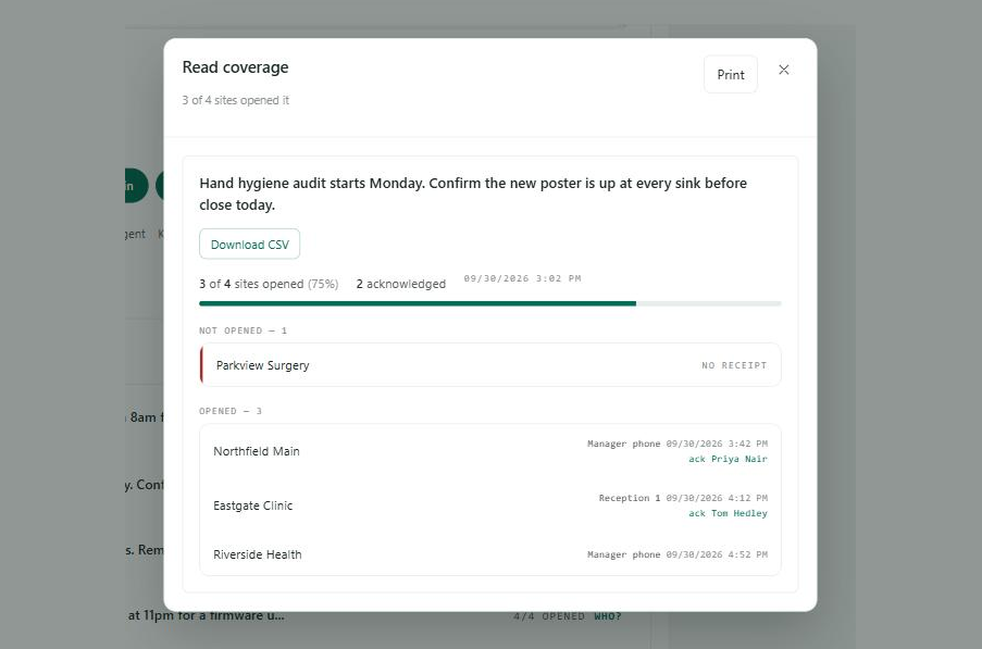
A custom report builder is a way of admitting you do not know what the answer should be. These are the six questions multi-site operators actually ask.